After getting my hands on a shiny new CPU (the AMD Ryzen 7 9800X3D), I noticed a bunch of people online happily undervolting theirs. Naturally, that sent me spiraling down the rabbit hole to figure out what the heck all of that actually means.
What is undervolting?
Undervolting your CPU means giving it less power–literally. At first glance that might sound counterintuitive, but for CPUs it actually works. Done right, undervolting can offer real benefits with minimal risk.
When done properly, undervolting helps your processor run cooler and more efficiently, which in turn improves overall performance and stability.
As your CPU sips instead of chugs power, you gain more than just small savings on the next power bill. Temperatures drop, thermal throttling1 can be reduced (or eliminated), and the processor experiences less wear over time. If you’re on a laptop, you might even get a bump in battery life.
Traditionally, undervolting has mostly been the domain of Intel CPUs. This is partly because past AMD chips, like the Ryzen 5000 series, weren’t exactly team players when it came to voltage tweaks. But times change.
Oh, and the CPU is not the only component you can undervolt. You can also undervolt GPUs to achieve similar results, lower power consumption, lower temperatures, and stable performance.
Undervolting vs underclocking vs overclocking
If you’re unfamiliar with the term, undervolting may be easily confused with underclocking or even overclocking, but all three are different.
Underclocking
Lowering your processor’s frequency. While it has its upsides like I said before, as you lower your clock speed, your CPU will be forced to throttle its own performance and won’t put out the kind of performance you’d like to see. Underclocking is mainly used for extreme power saving or thermal control, and it’s not the same as undervolting because undervolting tries to keep the clock speed unchanged.
Overclocking
The spicy cousin of underclocking. You raise the CPU’s frequency past what the manufacturer recommends, squeezing out extra performance. Of course, this comes at the cost of more heat, higher power draw, and possibly voiding your warranty if you really push it. You can undervolt while overclocking, but it’s a tightrope walk, and results vary depending on your specific chip’s tolerances.
- Undervolting = lower voltage, same frequency (ideally) → more efficiency
- Underclocking = lower frequency (and possible voltage) → less performance, more savings
- Overclocking = higher frequency (and often higher voltage) → more performance, more heat
How undervolting works
Modern CPUs are built to operate across a range of voltages, dictated by a thing called the voltage-frequency curve. For each frequency, there’s a minimum voltage that ensures stability. Manufacturers play it safe by setting default voltages above that minimum, because not all chips are created equal, thanks to the Silicon Lottery2.
By shaving off some excess voltage (let’s say, just 0.1V), you can see noticeable drops in CPU temperature under load. Less heat means sustained performance and lower fan noise under load.
Is undervolting safe?
Generally? Yes. It’s not a hack or a sketchy BIOS mod that you saw on YouTube. But it does require some finesse.
Stability testing
You should always test how stable your undervolt is. Use:
- Stress tests: AIDA64
- Benchmark Loops
- Real-world workloads: Test whatever you normally do
- Idle and light load behavior: Occasionally undervolting can cause idle or low-load instability
Golden Rule: Go slow. Make one small change at a time. Don’t crank the undervolt dial to 11 and pray.
Things to pay attention to
An important issue I came across while testing is something called clock stretching.
Here’s what’s happening in the image below:
- Voltage Drops (Droop) – That red line is your CPU’s voltage supply (Vdd). Under heavy load or aggressive undervolting, it can take a quick dive below the safe threshold, and the CPU detects this dip the moment it crosses the supply droop threshold.
- Clock Stretching Kicks In – To avoid crashing or throwing a tantrum, the CPU slows down its internal clock, not the visible frequency, but the real timing of how instructions are processed. This is shown by the Adaptive Clock (bottom row) spacing out compared to the steady PLL Clock above.
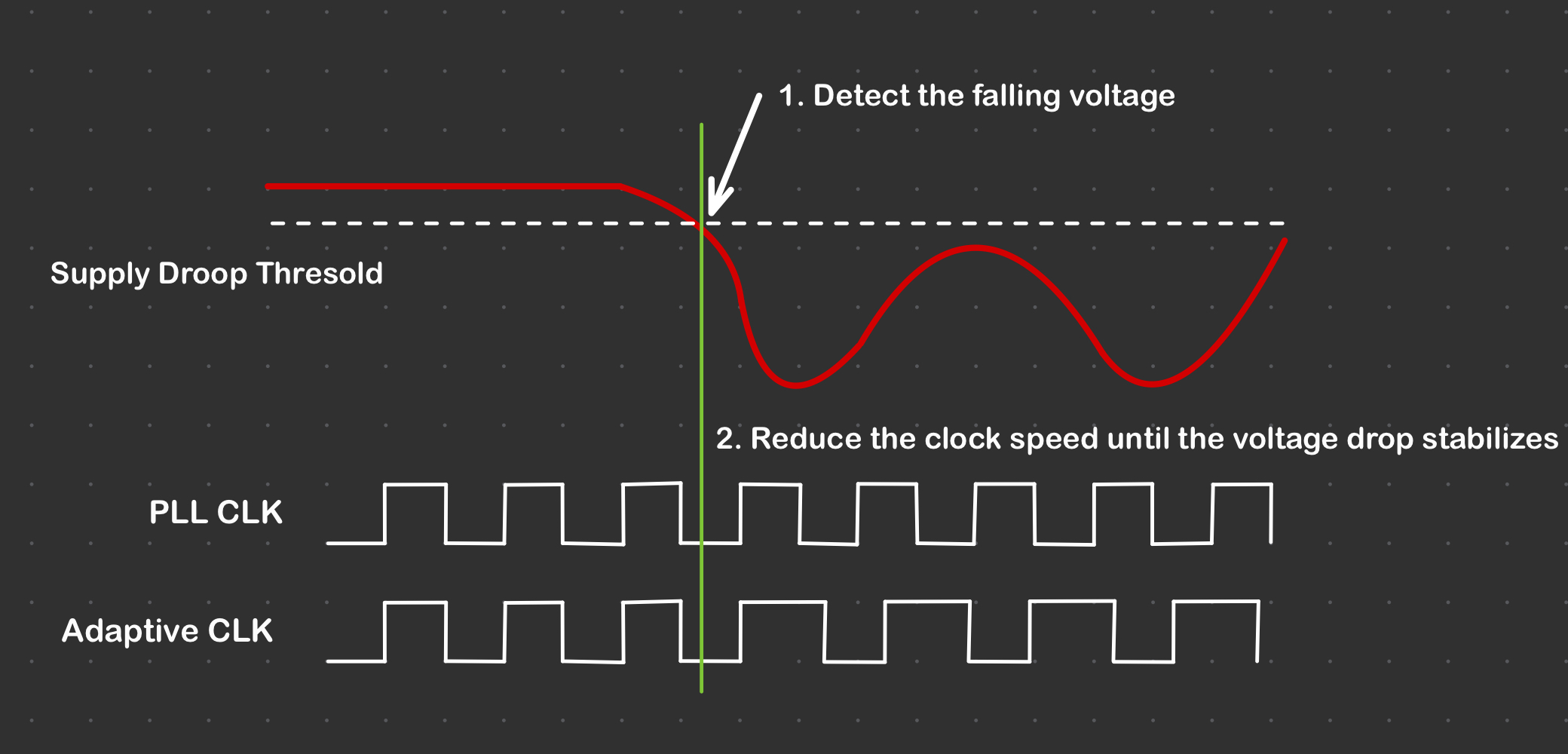
Clock stretching isn’t always bad, it’s a safety net. But if you’re undervolting too aggressively and this keeps happening, it’s a sign to dial things back a notch, because the clock speed you see in software isn’t necessarily what the CPU is actually running at.
Test results
I ran a series of stress tests using AIDA64 to push the CPU and observe behavior under load. For monitoring, I used HWMonitor (to track temperatures and clock speeds) and a physical wattmeter for power-draw readings, since software power estimates aren’t always reliable.
My specs for reference:
- AMD Ryzen 7 9800x3D
- ZOTAC GeForce RTX 3080 Trinity 10 GB
- Corsair Vengeance 32GB (2x16GB) DDR5 6000MHz CL30
- ROG Strix B650E-I
- Cooler Master NR200P Max
- Cooler Master V850 SFX Gold 850W
| 0V | Idle | 100% |
|---|---|---|
| Temperature | 39º | 74 ºC |
| System Wattage | 93 W | 190 W |
| Clock | 4.2 GHz | 5.2 GHz |
| -10mV | Idle | 100% |
|---|---|---|
| Temperature | 39ºC | 70 ºC |
| System Wattage | 90W | 181 W |
| Clock | 4.2 GHz | 5.2 GHz |
| -20mV | Idle | 100% |
|---|---|---|
| Temperature | 38 ºC | 66 ºC |
| System Wattage | 85W | 178 W |
| Clock | 4.21 GHz | 5.2 GHz |
| -25mV | Idle | 100% |
|---|---|---|
| Temperature | 39ºC | 66ºC |
| System Wattage | 80.5 W | 172 W |
| Clock | 4.2 GHz | 5.2 GHz |
| -30mV | Idle | 100% |
|---|---|---|
| Temperature | 39 ºC | 65ºC |
| System Wattage | 77W | 171 W |
| Clock | 4.2 GHz | 4.6 GHz |
Conclusion: so, did it work?
Yep, and pretty elegantly too.
From 0V down to -30mV, we see consistent drops in wattage and temperature without sacrificing performance, until the very end. At -30mV, the CPU finally says nah and downshifts to 4.6 GHz under load, likely to avoid thermal limbo.
My CPU’s sweet spot ended up around -20mV to -25mV, where temperatures stay cool, wattage drops noticeably, and performance remains intact even under full load. Undervolting is free performance tuning with real benefits, as long as you don’t push too far and trigger throttling.
As always: test thoroughly, monitor temps, and have fun :)
-
When the CPU limits itself due to reaching a certain temperature ↩︎